
myaadhaar.uidai.gov.in is the official, centralized online service portal launched by the Unique Identification Authority of India (UIDAI). Whether you want to complete a quick aadhar card download, change your residential address, order a durable PVC card, or check your update status, the My Aadhaar dashboard brings every identity service onto a single digital platform.
Instead of visiting a physical Aadhaar Seva Kendra for basic changes, residents across India can now use their registered mobile number and OTP to log in to the My Aadhaar portal and manage their profile in minutes. Below is a complete step-by-step guide to using every service on the portal safely and quickly.
Popular Aadhaar Services
Download digitally signed and password protected electronic copy
Check the status of the Enrolment or Update request
Validate the status of the Aadhaar
Use your documents or family member’s Aadhaar
Find your Bank Seeding Status
Update Services
Keep Aadhaar Secure
Download digitally signed and password protected electronic masked copy
Generate 16 Digit Virtual ID(VID) pathed to your Aadhaar
Temporarily lock/unlock your Aadhaar
Lock your fingerprints and iris data
Quick Overview: My Aadhaar Portal Highlights
| Portal Feature | Official Details |
| Portal Name | My Aadhaar (by UIDAI) |
| Official Website | https://myaadhaar.uidai.gov.in/ |
| Primary Services | Aadhar Download, Online Address Update, PVC Card Order, Biometric Lock |
| Login Requirement | 12-Digit UID Number + Registered Mobile OTP |
| E-Aadhaar PDF Password | First 4 letters of your name in CAPITALS + Year of Birth (YYYY) |
| Service Coverage | 100% Across India (Available 24/7 in Multiple Regional Languages) |
Services Available on My Aadhaar Dashboard
UIDAI has divided the My Aadhaar portal into two categories: services that require OTP login and open services that you can use even without logging in.
1. Services Requiring My Aadhaar Login (With Registered Mobile OTP)
- Online Address Update: Change or correct the address printed on your card by uploading a valid Proof of Address (PoA) or using the Head of Family (HoF) feature.
- Document Update: Upload your latest Proof of Identity (PoI) and Proof of Address (PoA) documents if your card was issued more than 10 years ago and has never been updated.
- Bank Seeding Status: Check which bank account is currently linked to your profile for Direct Benefit Transfer (DBT) and government subsidies.
- Lock / Unlock Biometrics: Secure your fingerprints, iris scan, and face data against unauthorized use.
- Update History: View a chronological log of all past demographic and biometric changes made to your profile.
2. Services Available Without Login
- Download Aadhar Card (e-Aadhaar): Get a digitally signed PDF copy using your UID, Enrolment ID (EID), or Virtual ID (VID).
- Order Aadhaar PVC Card: Order an official wallet-sized plastic card with advanced security features for a nominal fee of ₹75.
- Check PVC Card & Enrolment Status: Track the delivery of your plastic card or check whether your newly enrolled card has been generated.
- Verify Email / Mobile Number: Confirm if your current phone number or email ID is registered in the UIDAI database.
- Generate Virtual ID (VID): Create or retrieve a temporary, revocable 16-digit number to use in place of your main identity number for KYC.
How to Login to the My Aadhaar Portal (myaadhaar.uidai.gov.in)
To access personalized services like address updates or biometric locking, follow these steps to sign in:
- Visit the Official Portal: Open your browser and go to myaadhaar.uidai.gov.in.
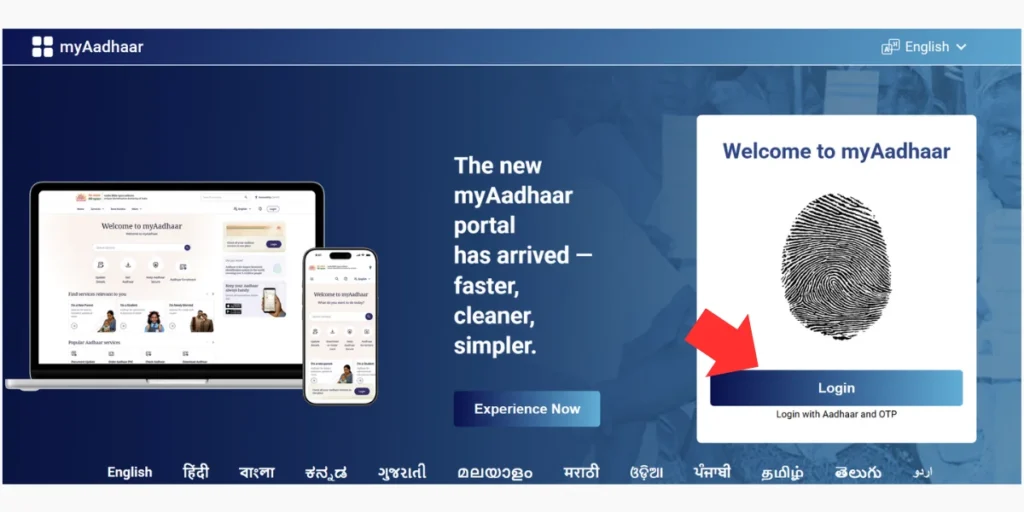
- Click on Login: Tap the “Login” button located right below the fingerprint graphic on the welcome screen.
- Enter Your Details: Type your 12-digit identity number and carefully enter the security Captcha code shown on the screen.
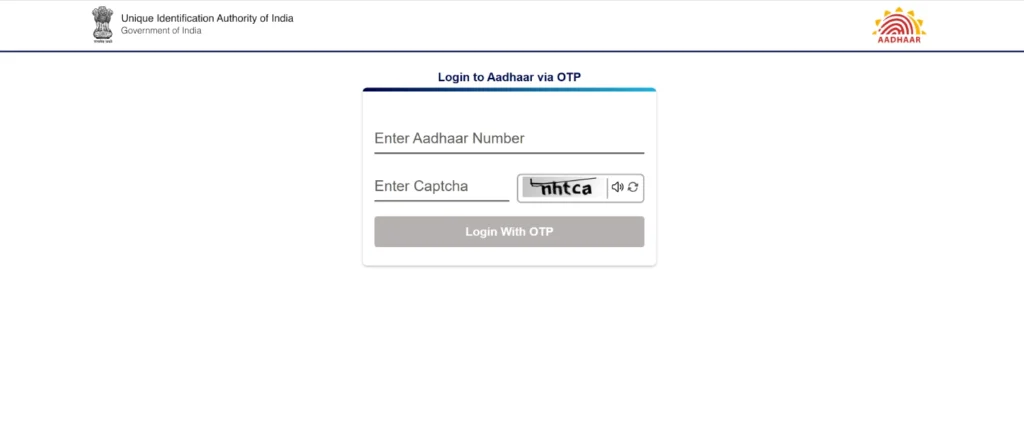
- Request OTP: Click on “Login With OTP”. A 6-digit One-Time Password will be sent to your registered mobile number.
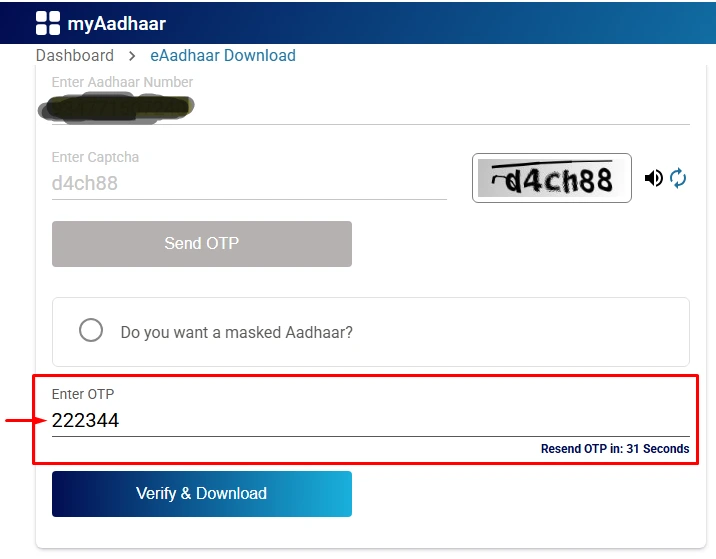
- Access Dashboard: Enter the received OTP and click “Login”. You will now be redirected to your personal My Aadhaar dashboard, where you can view your profile photo and flip the card to check your current address.
Step-by-Step Guide: Aadhar Card Download Online (PDF)
Searching for an easy aadhar download method is the most common reason citizens visit the portal. An e-Aadhaar downloaded from the official website is legally valid everywhere across India under the Aadhaar Act.
Whether you search for aadhar card download or adhar card download, you can get your digital copy in less than two minutes using three different numbers:
Method 1: Download Aadhar Card Using 12-Digit UID Number
- Go to the My Aadhaar homepage myaadhaar.uidai.gov.in and scroll down to the “Download Aadhaar“ tab.
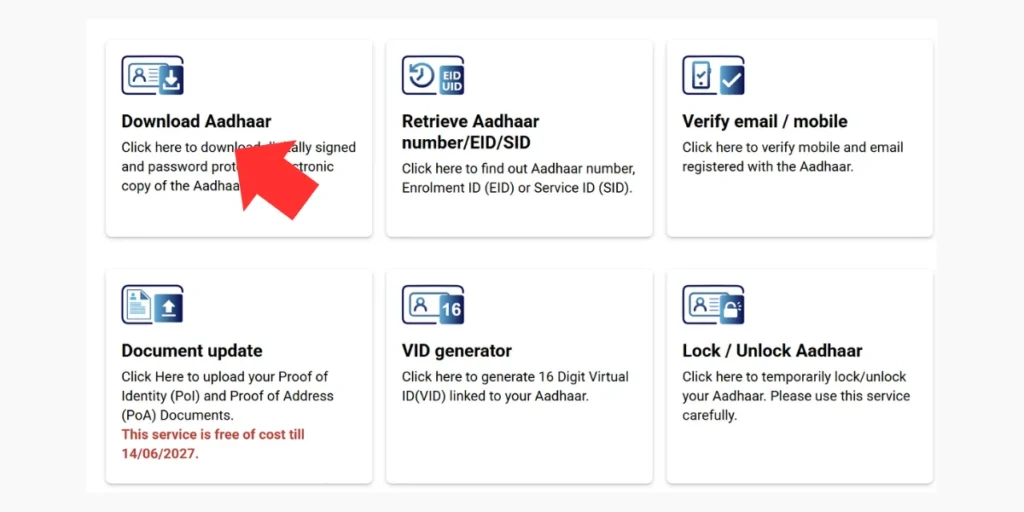
- Select the “Aadhaar Number” radio button at the top of the form.
- Enter your 12-digit number along with the Captcha code, then click “Send OTP”.
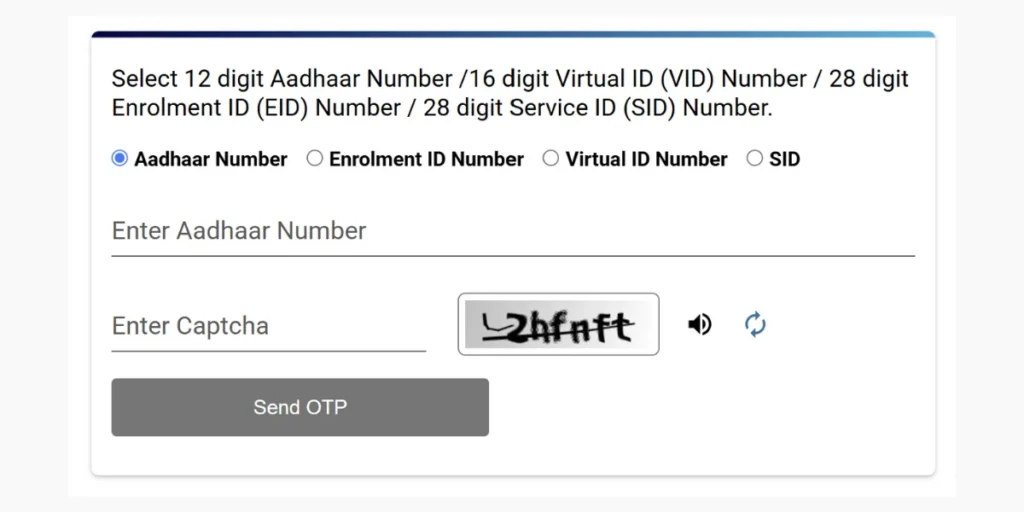
- (Optional) If you do not want your full number visible on the PDF for privacy reasons, tick the checkbox that says “Do you want a masked Aadhaar?” before verifying the OTP.
- Enter the 6-digit OTP received on your phone and click “Verify & Download”.
- Your aadhar download will start automatically in PDF format.
Method 2: Using 28-Digit Enrolment ID (EID)
If you recently enrolled at a center and have not received your physical letter by post yet, you can still download aadhar card copies using your acknowledgement slip:
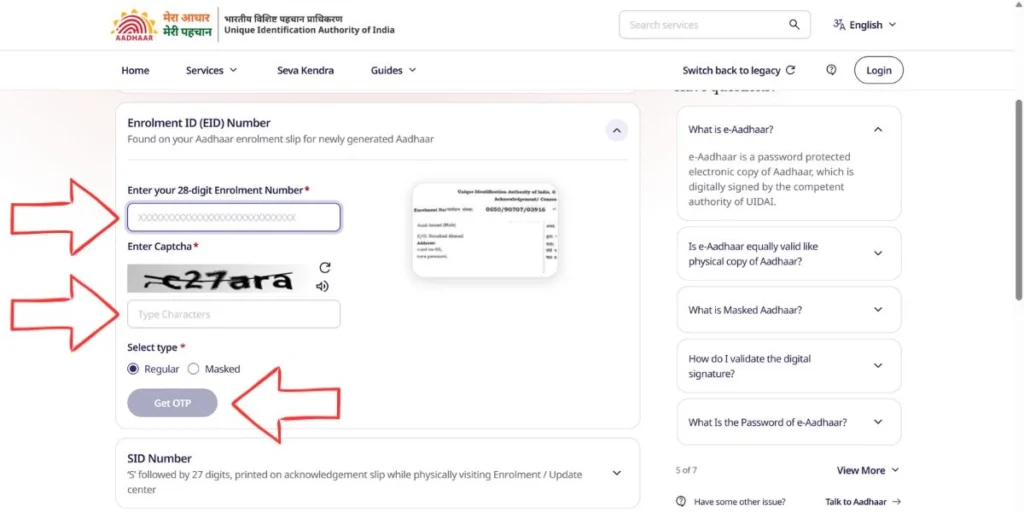
- On the download page, select the “Enrolment ID Number” option.
- Enter the 14-digit Enrolment Number (found on your slip) and carefully select the 14-digit Date and Time stamp (YYYY/MM/DD HH:MM:SS).
- Fill in the Captcha, verify the OTP sent to your phone, and save your PDF file.
Method 3: Using 16-Digit Virtual ID (VID)
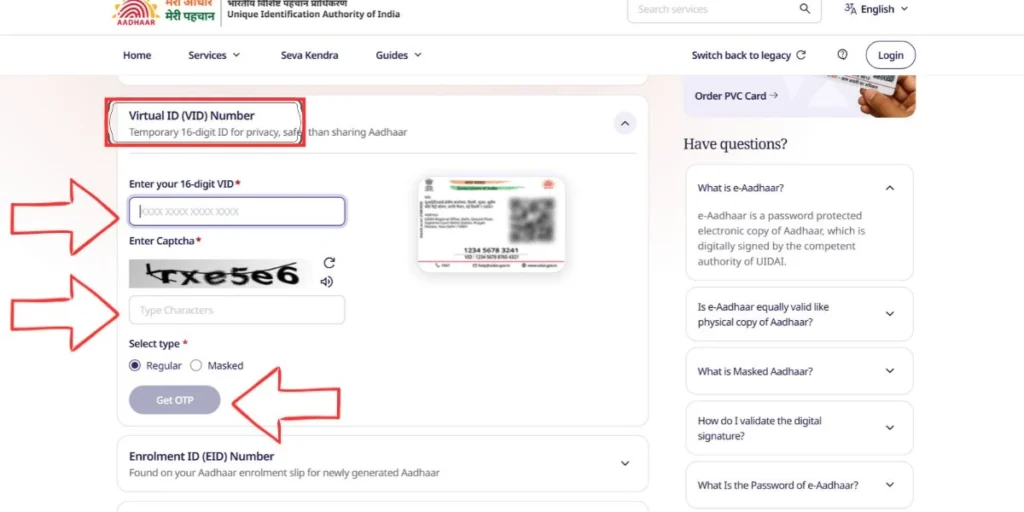
- Choose the “Virtual ID Number” tab on the download screen.
- Enter your 16-digit VID and Captcha code.
- Verify your mobile OTP to complete the adhar card download instantly.
How to Open Your e-Aadhaar PDF Password
Every file obtained through the aadhar card download process is protected by an 8-character password to keep your personal data safe.
- Password Format: The first 4 letters of your name in CAPITAL letters (exactly as printed on your card) followed by your 4-digit Year of Birth (YYYY) without any spaces.
Examples to Help You Unlock the PDF:
| Name on Card | Year of Birth | Your 8-Character PDF Password |
| RAMESH KUMAR | 1995 | RAME1995 |
| PRIYA SHARMA | 2001 | PRIY2001 |
| RIA SEN (Only 3 letters in first name) | 1998 | RIA 1998 (Or include the first letter of surname: RIAS1998 if printed without space) |
| A. K. VERMA (With initials) | 1988 | A.K.1988 (Include dots/spaces exactly as shown on your enrolment slip) |
How to Update Address Online on My Aadhaar?
If you have shifted to a new house or city, you can update your address online without visiting an enrolment center:
- Log in to the My Aadhaar portal using your OTP.
- Click on the “Address Update“ card and select “Update Aadhaar Online”.
- Choose “Address” from the list of demographic fields and click “Proceed”.
- Your current address will be displayed. Scroll down and enter your New Address details (Care Of, House/Building, Street, Landmark, PIN Code, and Post Office). The portal will automatically translate your details into your local regional language.
- Select a valid supporting document from the dropdown menu (such as Voter ID, Passport, Electricity Bill, Ration Card, or Marriage Certificate) and upload a clear scanned copy (in PDF or JPEG format under 2MB).
- Preview your details, pay the non-refundable online processing fee, and download the Service Request Number (SRN) receipt to track your update status.
👉 Track Your Request Here: Check Aadhaar Status Online by 28-Digit EID, SRN & URN
How to Order Aadhaar PVC Card Online?
Paper laminated cards easily wear out over time. Through My Aadhaar, you can order a durable polyvinyl chloride (PVC) card equipped with a secure QR code, hologram, micro-text, and embossed logo:
- Visit https://myaadhaar.uidai.gov.in/ and click on “Order Aadhaar PVC Card”.
- Enter your 12-digit number (or 28-digit EID) and Captcha code.
- Note for Non-Registered Mobile Numbers: Even if your mobile number is not linked to your card, you can tick “My mobile number is not registered”, enter any active family phone number to receive the OTP, and place the order!
- Verify the OTP, agree to the payment terms, and pay ₹75 (inclusive of GST and Speed Post delivery charges) via UPI, Net Banking, or Debit Card.
- India Post will deliver the plastic card to your registered address within 5 to 15 working days.
Frequently Asked Questions (FAQs)
-
What is the official website for My Aadhaar login and download?
The official portal is https://myaadhaar.uidai.gov.in/, operated by UIDAI. All online demographic updates, biometric locks, and aadhar download services are hosted on this subdomain.
-
Can I complete an adhar card download without a registered mobile number?
No, an online adhar card download requires OTP verification sent strictly to your registered mobile number. However, if your phone number is not linked, you can either visit the nearest Aadhaar Seva Kendra or order a physical PVC Card online using any alternate mobile number for ₹75.
-
Is the downloaded e-Aadhaar PDF equally valid as the original physical card?
Yes. According to UIDAI regulations, a downloaded e-Aadhaar (both regular and masked versions) carries a valid digital signature and holds the exact same legal validity as the physical letter issued by post.
-
Can I update my mobile number or date of birth online through the My Aadhaar portal?
Currently, the web portal allows Address Updates and Document Updates (PoI/PoA) online. For updating your mobile number, biometric data (fingerprints/iris/photo), or Date of Birth, you need to visit an authorized Aadhaar Enrolment Center or book a home service appointment where available.